
Pick-by-light: how it works and when it pays off
By Jorg Hendrikx, CEO, VlegelPublished on Updated on Reading time: 6 min
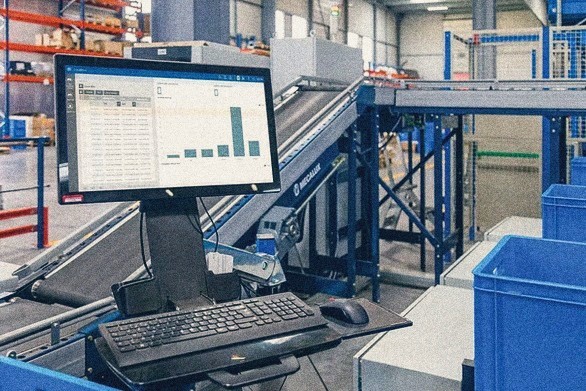
Pick-by-light means picking orders using lights. A light at each location shows where to pick, and a display shows how many. The picker takes the items, presses the button, and the next location lights up. No paper, no scanner, no searching.
How does pick-by-light work?
Each location gets a module with a light, a small display and a button. From there, it works in four steps:
- The WMS or ERP sends an order to the pick-by-light system.
- The locations for that order light up. The display shows the quantity.
- The picker takes the items and presses the button, or a sensor detects the pick.
- The light goes out, the system reports the pick to the WMS and the next location lights up.
If several pickers work in one zone, each gets their own colour. That works, but with more than a few pickers it gets confusing.
What is the difference between pick-to-light and put-to-light?
With pick-to-light, the light shows which location to pick from. With put-to-light, you take an item and the light shows which bin, trolley or pallet it belongs on. Put-to-light is used for sorting and splitting a batch across several orders.
When does pick-by-light pay off?
When you make lots of small picks from fixed racking, and a wrong pick costs you money or a customer.
| Advantage | Disadvantage |
|---|---|
| Fewer picking errors. The picker sees the location and quantity. | Investment per location: module, wiring and software. |
| Faster picking. No pick list, less time searching. | Fixed layout. If your stock moves around often, the hardware has to move too. |
| Quick to learn. Useful for temporary staff and peak periods. | Only a few pickers per zone. |
| Hands free. | Without proper integration with your WMS or ERP, all you have is expensive lights. |
| Stock levels stay accurate. Every pick updates stock immediately. |
Choose something else if your product range changes often (scanner), if you pick large items or pallets (scanner or pick-by-voice), or if you only handle a few dozen orders a day (a good pick list or a screen will do).
How do you connect pick-by-light to your WMS or ERP?
The WMS decides what needs picking. The pick-by-light system displays it and reports back. The integration needs to get three things right:
- Sending orders. The WMS turns an order into instructions for each location, sequenced for the shortest walking route.
- Reporting picks. Every confirmation updates stock immediately. That tells the WMS when a location needs replenishing and when an order can go to packing.
- Keeping locations accurate. The location number in the WMS must always match the module on the racking. If an item moves, you update it in one place, not two.
Most WMS packages have an API or a standard connector. No WMS? Your ERP can supply the orders and stock data instead. Before buying hardware, ask how your WMS or ERP passes on instructions. That often has more impact on the project timeline than the racking itself.
Every confirmed pick is also data: which zone is slowing down, what time errors peak, which item keeps causing trouble. Store that data with clear names and definitions, and you can use it for more than just updating stock later.
Two examples from the field
In both cases, the answer was a screen rather than a light at every location. The idea stayed the same: show the operator where something belongs, at the right moment.
Royal FloraHolland: sorting flowers onto trolleys
At Royal FloraHolland’s Dock Services in Aalsmeer, pallets of flowers arrive, mainly roses from Africa. BEUMER Group built a sorting machine that sorts the boxes onto trolleys in a refrigerated area. At launch, Royal FloraHolland was aiming for a capacity of around 2,000 boxes per hour, compared with 800 by hand (Hortibiz, 2022).
Each box has a QR code containing the variety, length and colour. The buyer specifies how the boxes should be arranged on the trolley. BEUMER commissioned us to write the software that controls the machine and guides the operators.
- For each shipment, the software receives a list: which box goes on which trolley, and where.
- It controls the machine so that every box reaches the right exit.
- A screen at each exit shows the trolley. Blue marks the box arriving now, green the box the operator is holding, and grey what is already on the trolley.
- A team leader scans a box with a handheld scanner. The screen shows where it belongs in orange.

Sorting boxes onto pallets
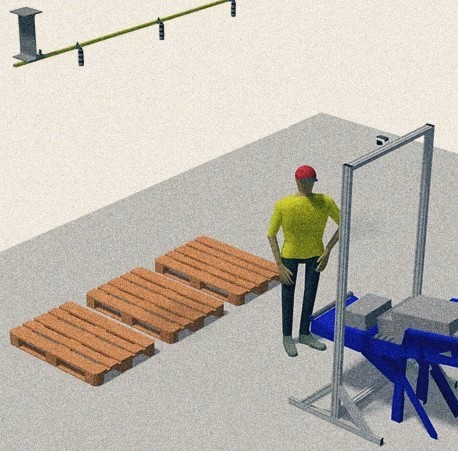
At a distribution centre, one or two operators worked at the exit of a sorting system. They sorted boxes onto three pallets. A scanner above the exit read each box and identified the correct pallet. We tested two ways to show this:
- A signal tower above each pallet: green for the correct pallet, orange when the second operator needs to help, red for an unknown barcode.
- A screen within the operator’s line of sight, using the same colours.
The operators chose the screen. They found it clearer and more comfortable to work with.
What can you skip?
- A light at every location. Start with the zone with the most picks or the costliest errors.
- Buying a new WMS. First check what your current WMS or ERP can pass on. An integration is usually enough.
- Choosing hardware straight away. Sometimes a screen at the workstation does the same job, for less money and with fewer cables.
How do you get started with pick-by-light?
- Count your errors. How many wrong picks per week, and what does each error cost in returns or redelivery?
- Choose one zone where those errors happen most often.
- Check your WMS or ERP. How does it send an order, and how does it receive a confirmation?
- Test two options side by side, such as lights and a screen, with your own pickers.
- Measure again after a month. If it works, that zone becomes the template for the next.
Conclusion
Pick-by-light makes order picking faster and error-free, but only with proper integration with your WMS or ERP. Start with one zone, test with your own pickers, and don’t be afraid to choose a simple screen if that does the job.
Want to know whether pick-by-light would pay off in your warehouse? We’ll look at one zone together and tell you honestly whether lights, a screen or a scanner would work best. Book a conversation
Read also: Improving OEE · Bespoke or off-the-shelf software? · For machine builders
Frequently asked questions
What is pick-by-light?
A way of picking orders where a light at each location shows where to pick and a display shows how many. The picker confirms with a button.
Is pick-to-light the same as pick-by-light?
Yes. They are two names for the same system.
When is pick-by-light not the best choice?
If your stock moves around often, if you pick large items or pallets, or if you handle few orders per day. A scanner, pick-by-voice or a screen will often work better.
Do I need a new WMS for pick-by-light?
Usually not. Most WMS and ERP packages can send orders via an API or a standard connector.